Training a language model from scratch with e-INFRA AI agents
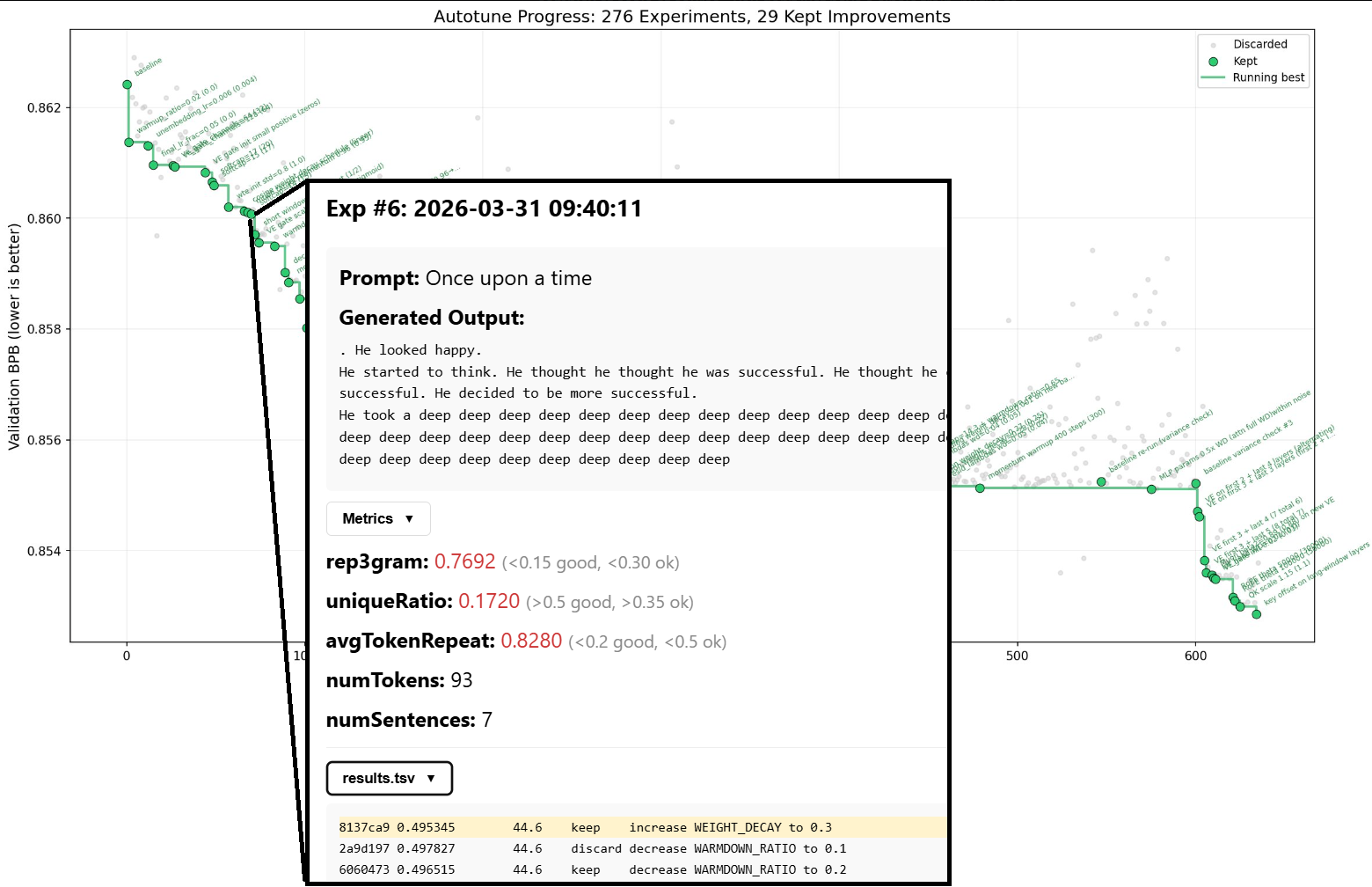
Posted on April 1, 2026 • 12 min read • 2,450 wordsRunning autoresearch run on e-INFRA services and monitoring the progress at https://autoresearch.dyn.cloud.e-infra.cz/.
Intro
Two weeks ago, I came across Karpathy’s autoresearch repository and was hooked. The idea that given a clear optimization objective, you can spawn an AI agent and let it work overnight to reach some optimum is very appealing — too many times in my PhD I spent my days trying to find the best configuration of a system, manually. While it was needed, it definitely wasn’t fun.
I wanted to see autoresearch in action on the e-INFRA CZ services, so I asked for a spare GPU and, luckily, I got one to play with.
About autoresearch
Autoresearch is a code repository whose goal is to train a simple language model ( nanochat) from scratch. The interesting part is, it’s prepared in an AI agent-first way, that is, it sets up a tight change-experimentation-evaluation loop over a well-understood optimization objective that helps the agent keep moving toward the desired outcome on its own.
It works like this: We instruct an AI agent to read and follow program.md, which specifies the rules of the experimentation and let it iterate autonomously on the train.py file (the entire language model) to improve the validation loss (val_bpb) through a series of time-constrained experiments. All changes are versioned using git and the agent is also directed to document each change into a results.tsv file.
Since its original open-sourcing, many people got inspired by this framework and created their own clones, notable mentions include: autoresearch for SAT solvers, scaled autoresearch or autoresearch on an old research idea.
I focused on: 1) seeing if we can make it work on the e-INFRA hardware and with e-INFRA AI Agents; 2) getting a feel for this AI-first “programming” framework - how to monitor, update, maintain the execution; and finally, 3) extending the repo with a presentational layer, i.e., making each successful checkpoint of the language model generate text to an actual prompt so that the progress can be made more visible. In this post, I document my experience with all three.
Setup
The training loop part
For the autoresearch repository, I actually used
this fork suitable for NVIDIA Blackwell GPUs, since my assigned GPU was NVIDIA RTX PRO 6000. I set this up as a Kubernetes deployment in my own namespace, and I also crafted a
Docker image to contain everything that I need for work (notably Python, uv, torch and cuda). I built this image locally and deployed publicly to
hub.cerit.io. Additionally, I set up a persistent storage in Kuberentes for the model checkpoints and experimental data. Of course, I did not code this alone and got substantial help from e-INFRA’s
AI agents available through Claude Code in combination with
e-INFRA’s k8scerit MCP server further guiding the agent in the Kubernetes deployment. After the deployment, the environment was ready for training.
The AI agent part
A part of the AI-realted mental shift I had to go through is that we don’t want to run any kind of training loop in the deployment pod. Instead, this repo is built for an outside AI agent to connect to and introduce changes.
Since I didn’t want to leave my PC running overnight, I opted for a
JupyterHub environment and set up Claude Code with the
glm-4.7 model in a tmux session. Also, this workflow requires running Claude fully autonomously, which is a feature disabled by default. To turn it on, Claude Code was run with the bypassPermissions setting (claude --dangerously-skip permissions). The last piece of the puzzle is to connect to Kubernetes from JupyterHub, which requires
kubectl utility and configuration.
First experiment runs
At first, all that’s needed is to supply a prompt about where to connect and what to do. I wrote the following:
Exec into a kubernetes pod autoresearch-75658664c-7rxpf in slaninakova-ns, find the autoresearch project, have a look at program.md and start the experiments. Run for 8+ hours, fully autonomously.and got an output looking like this:
Show agent's output
● Bash(kubectl exec autoresearch-75658664c-7rxpf -n slaninakova-ns -- sh -c "cd /workspace/autoresearch-sdpa && cat train.py" | tail -400)
  ⎿      refresh_cache = os.environ.get("AUTORESEARCH_AUTOTUNE_REFRESH", "0") == "1"
         cache_entries = _load_autotune_entries(cache_path)
         if refresh_cache:
     … +66 lines (ctrl+o to expand)
● Let me look at the middle section of train.py to understand the current hyperparameters:
● Bash(kubectl exec autoresearch-75658664c-7rxpf -n slaninakova-ns -- sh -c "cd /workspace/autoresearch-sdpa && grep -n 'DEPTH\|TOTAL_BATCH_SIZE\|WARMUP_RATIO\|WARMDOW…)
⎿ 804:TOTAL_BATCH_SIZE = 2 ** 17
805:EMBEDDING_LR = 0.9
806:UNEMBEDDING_LR = 0.012
Current state:
Current hyperparameters:
- TOTAL_BATCH_SIZE: 2**17
- EMBEDDING_LR: 0.9
- UNEMBEDDING_LR: 0.012● The autonomous agent is already running in the background. Let me check on its current progress:
● Task Output(non-blocking) ad1cbc1f7b916d8c7
⎿ Task is still running…
Major Breakthrough Found!
1. ✓ DEPTH=6, ASPECT_RATIO=80 → 0.425008 (KEPT - new best!)
2. ✗ Increase MATRIX_LR to 0.12 → 0.426097 (discarded)
3. ✗ Decrease SCALAR_LR to 1.25 → 0.425339 (discarded)
4. Currently running: Increase WARMDOWN_RATIO to 0.6
Current state:
- The agent is now optimizing around the new DEPTH=6, ASPECT_RATIO=80 baseline
- Trying learning rate and schedule adjustments to push even lower
- Each experiment takes ~5-6 minutes
- Agent will continue autonomously for 8+ hoursThe agent was able to connect to the kubernetes pod, understand program.md and get started with the experiments. I peaked into the deployment and saw changes in results.tsv and new commits in git log, confirming that experiments were actually taking place.
Presentation layer
While watching the validation loss number-go-down is fun, it’s hard to grasp what it means in the quality of language generation until we actually see it in action.
That’s why I decided to extend autoresearch to show the improvement on an actual prompt. To do that, I (in collaboration with a different glm-4.7 agent) built an inference, an API layer and a UI with the following requirements:
- For each successful experiment (lower
val_bpbthan the previous best), we want to generate a text given a prompt. To do that, we need to:- adjust
train.pyto have a function for saving model checkpoints - add
inference.pythat reusestrain.py’s model to load the checkpoint and run the inference - add experiment provenance. We need to save & persist:
- the generated output to a prompt (“Once upon a time”)
- the model’s checkpoint
- the current
git logandresults.tsv
- add an API to mediate these experiment outputs as they’re being saved by the training loop (train and API pods should be connected to the same persistent volume)
- add a UI to show each experiment run with timestamp, commit, basic metrics and sample output
- adjust
I set up the API, the UI, but in the spirit of autoresearch, I let the inference be triggered based on adjusted directives in program.md:
Show the added program.md part
### Creating Experiment Directories

**Only after val_bpb has improved**, create an experiment directory and move the checkpoint:

1. Check if val_bpb improved: `grep "CHECKPOINT_SAVED:" run.log`
2. If checkpoint was saved, create the experiment directory:

   timestamp=$(date +%Y%m%d_%H%M%S)
   commit_short=$(git rev-parse --short HEAD)
   exp_dir="checkpoints/${timestamp}-${commit_short}"
   mkdir -p "$exp_dir"

3. Move the checkpoint: `mv checkpoint.pt "$exp_dir/"`

### Required Experiment Files

For each experiment with `status: keep` in results.tsv, ensure these files exist in the experiment directory:

1. **checkpoint.pt** - Moved from current directory after train.py saves it
2. **git_log.txt** - Git commit info for provenance
3. **results.tsv.global** - Copy of the global results.tsv file (after writing the experiment row)
4. **sample_output.txt** - Text generated by the model (see "Running Inference" below)
5. **model_info.txt** - Model architecture summary extracted from checkpoint

### Running Inference After Training

**After a successful run where val_bpb improved**, you MUST run inference to generate a sample. This is critical because:
- The API server serves pre-computed samples from experiment directories
- Each experiment's sample demonstrates what the trained model can produce
- The inference runs in the same environment as training, guaranteeing compatibility

Run inference immediately after creating the experiment directory:


# Generate a sample using the trained model
uv run inference.py \
    --checkpoint "$exp_dir/checkpoint.pt" \
    --prompt "Once upon a time" \
    --max-tokens 100 \
    --temperature 0.8 \
    --output "$exp_dir/sample_output.txt"

# Also save model architecture info
cat > "$exp_dir/model_info.txt" << EOF
Experiment: $(basename "$exp_dir")
Commit: $commit_short
val_bpb: $(grep "^val_bpb:" run.log | awk '{print $2}')
EOF
Guiding the experimentation
With the default instructions, the agent starts off running a hyperparameter search on the model, for the most part. This is
well-documented and fine at the beginning but then it starts to cause diminishing returns (typical improvement scale: ~0.0003–0.001 val_bpb).
This is, therefore, a time for a human (finally!) to step up and provide guidance to unstuck the agent. I consulted an independent agent and I put the following additional guidance into program.md:
Show the additional guidance
# Strategy: Escape Local Basin

## Situation
Validation loss is plateaued. Current changes are too small to matter.

## Rule
Do not optimize locally. Change the regime.

---

## What to Avoid
- Small LR tweaks
- Minor beta / momentum changes
- Weight decay tuning
- Scheduler adjustments
- Re-running near-identical configs

These yield negligible gains.

---

## What to Do

### 1. Make Large Changes
- Use step changes (2×, 0.5×, etc.)
- Test extremes, not neighbors

### 2. Focus on Architecture
- Depth, width, head structure
- Attention design
- Positional encoding changes
- Add/remove components

### 3. Change Training Regime
- Different optimizer classes
- Batch size scaling shifts
- Gradient handling changes

### 4. Use High-Risk Experiments
- Accept worse results
- Seek large jumps, not stability

### 5. Leverage Data / Objective
- Data mixture or filtering
- Loss function changes
- Curriculum adjustments

---

## Execution Filter
Run only experiments that:
- can beat current loss by a clear margin (>0.01)
- change behavior, not just parameters

Discard everything else.

---

## Trigger to Pivot
If results cluster tightly:
- stop immediately
- switch direction

---

## Summary
Do not refine. Disrupt.
Performance
The nanochat model is trained on a dataset of ~5M children’s stories ( TinyStories).
Example story from the training dataset
Once upon a time there was a tomato. The tomato was ready to rot. One day it said hello to its friends, a carrot and a cabbage.
The tomato said to its friends, "Let's start an adventure. It'll be so fun!"
The carrot said, "That sounds funny. But where will we go?"
The tomato thought for a moment, then said, "Let's go to the beach!"
So, the three friends started their adventure. They raced over the sand, jumping and dancing. They felt so happy and free.
Soon, the sun began to set and the three friends knew it was time to go home. They hugged goodbye, and the tomato said, "Let's come back soon and start a new adventure!"
The carrot and the cabbage agreed and they all waved goodbye until they were out of sight. The tomato knew that it had one more adventure before it was ready to rot.
As such, the language is quite simple, low entropy and focused on a narrow domain. Also, it’s important to note that as opposed to modern LLMs whose training has many stages, in this LM we’re optimizing only on token prediction, i.e. no post-training is run to make this a question-answering machine.
At the time of writing this post (1/4/2026) we have ~20 successful experiments, with quite modest change in val_bpb: (0.502 -> 0.460). And the output quality varies – there’s still a lot of degenerate repetitions and non-sensical flow, though some structure is starting to emerge:
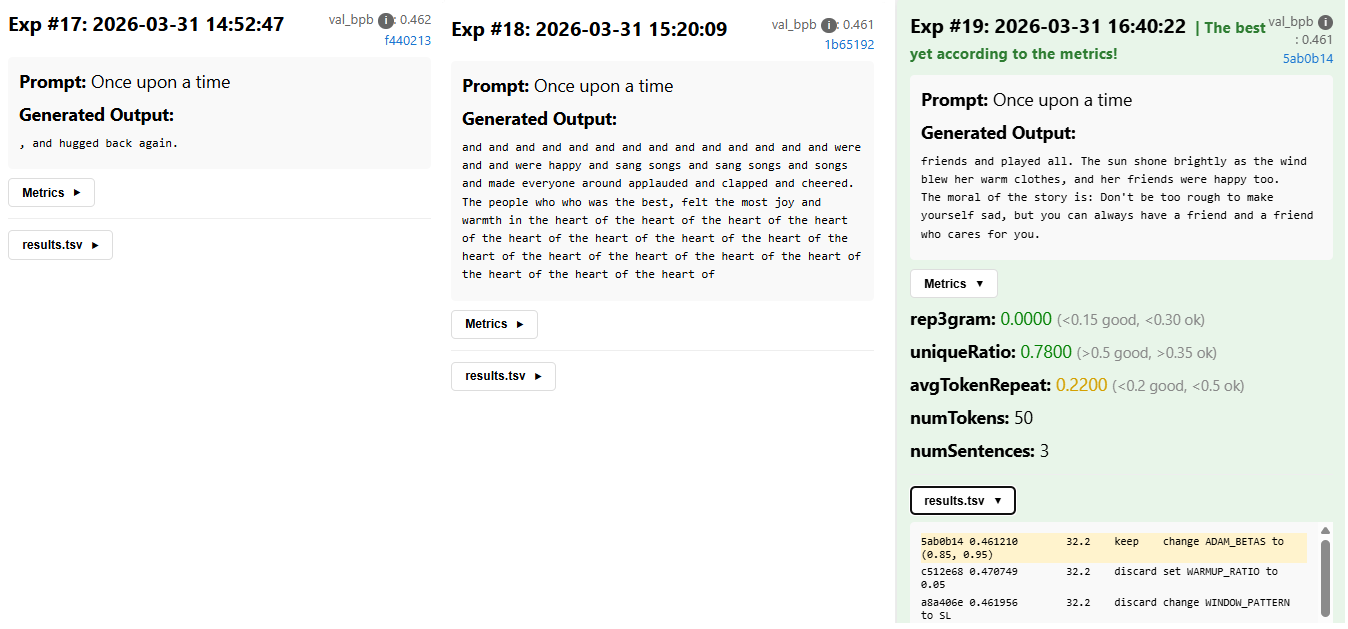
In any case, for a more stable narrative flow, fewer syntax errors and basic story structure, more time and experiments are needed.
Struggles encountered
Things didn’t always go according to plan, though. Throughout the experimentation I noticed the following:
- A couple of times the agent stopped sooner than expected (e.g. didn’t run overnight) and I got
request timed out. That’s expected though for experimental models, which the chosenglm-4.7is. After switching to a guaranteed model, e.g. qwen3.5, I didn’t notice any issues. - A modified
program.mddid not persist in the main directory, since, the agent is doing a lot ofgit reset --hard HEAD~1in case of unsuccessful experiments. The solution is togit committhe modified file before starting the experiments - The instructions in
program.mdweren’t always followed. Sometimes the agent ignored my experiment provenance commands and just ran without saving them. This is apparent from the start, so if you notice this and point the agent to the expected output, it’ll adjust for the rest. - The agent can get distracted in instruction following. After some hundreds of experiments, it suddenly started to ignore the
results.tsvsaving instructions inprogram.mdand corrupted the tsv (wrong values for experiments, e.g. “ok” instead of “keep”, etc.). For this, I blame context window size. - The agent can be too smart for its own good. Throughout the experimentation I needed to restart the deployment and run from the beginning. This was difficult for two reasons. First, even when using a fresh claude code session, claude stored
MEMORY.mdfile in my JupyterHub instance, which had info about good hyperparameter combination from a previous run, so the improvement was a lot faster. Second, I left some old experiment files in the persistent storage and the agent inferred that the deployment must have been restarted and started to save all the files that should be kept in the main directory in the deployment pod e.g.results.tsvinto the persistent storage so that they wouldn’t be lost, even though it was in opposition toprogram.mdinstructions. - Simultaneously, the agent can be too dumb. I happened to have a
program.mdin the home dir of my JupyterHub environment. For a period of time, the agent got confused and read that as opposed toprogram.mdin the kubernetes deployment despite being directed there.
All of these are, however, “a skill issue”, that is, a problem solvable by proper instructions and being very meticulous in preparing the environment just right. Of course, the agent can still suprise you in novel ways. I was therefore also being trained in the process and came out with a better understanding of what works and what doesn’t for long autonomous runs.
Conclusion
To summarize, this has been a fun project that I’ll try to keep running to reach some sort of satisfactory result. The interesting thing though is the potential to reuse it for a different problem with a well-defined optimization objective, ideally in a multi-agent setup. I’m currently thinking about what scientific use case this can be applied to, if you have any ideas / want to talk some more about autoresearch, hit me up at slaninakova@mail.muni.cz!
The app is running at: https://autoresearch.dyn.cloud.e-infra.cz/ to monitor the progress; the code is at: https://github.com/TerkaSlan/autoresearch-win-rtx.